1. Log in to your Plesk account.
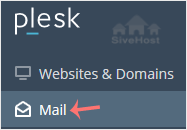
2. Click on Mail from the Sidebar Menu.
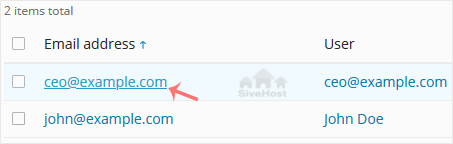
3. From the email list, click on the email account you want to rename.
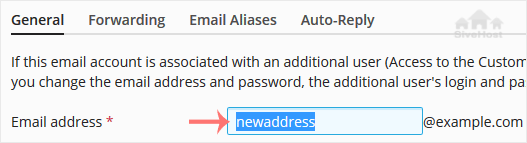
4. Enter the new email name in the email address field.
5. Scroll down and click OK.

1. Log in to your Plesk account.
2. Click on Mail from the Sidebar Menu.
3. From the email list, click on the email account you want to rename.
4. Enter the new email name in the email address field.
5. Scroll down and click OK.
Follow this tutorial to create an email account in Plesk. 1. Log in to your Plesk account....
You can access your Email directly from Webmail. Open https://webmail.example.com, and...
You can change your email password in Plesk through the following steps: 1. Log in to your...
Ditsebi tša rena di tla fetišetša sebaka sa gago ka polokego ka nako ya go se šome ya lefela - ntle le ditshenyagalelo tše di oketšegilego. Go huduga mo go se nago mathata mo go swarwago ke sehlopha sa rena gore o kgone go tsepamiša kgopolo kgwebong ya gago.


Tokelo ya Ngwalollo © 2026 Creative Matrix. Ditokelo Tšohle di Beetšwe.