1. Log in to your Plesk account.
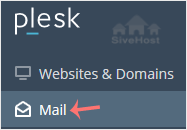
2. Click on Mail from the Sidebar Menu.
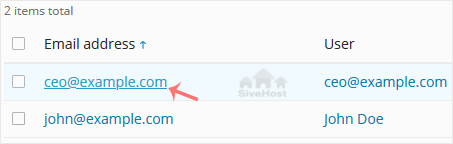
3. From the email list, click on the email account you want to rename.
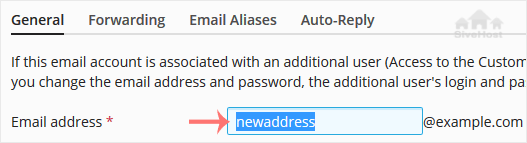
4. Enter the new email name in the email address field.
5. Scroll down and click OK.

1. Log in to your Plesk account.
2. Click on Mail from the Sidebar Menu.
3. From the email list, click on the email account you want to rename.
4. Enter the new email name in the email address field.
5. Scroll down and click OK.
Follow this tutorial to create an email account in Plesk. 1. Log in to your Plesk account....
You can access your Email directly from Webmail. Open https://webmail.example.com, and...
You can change your email password in Plesk through the following steps: 1. Log in to your...
Bantu na beto ya mayele ta pesa site na nge na lutaninu yonso kukonda ntangu ya kukangama - kukonda kufuta mbongo ya nkaka. Migrasio ya kukonda mpasi yina ekipi na beto ke twadisaka sambu nge tula dikebi na kisalu na nge.


Copyright © 2026 Creative Matrix. All Rights Reserved.