1. Log in to your cPanel account.
2. In the Domains section, click on Redirects.

3. Scroll down to the end of the page. Under Current Redirects, locate the domain and click on remove. 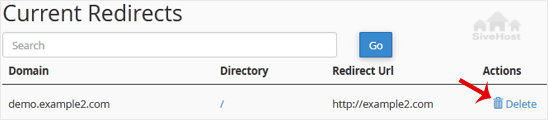
4. For confirmation, click on Remove Redirect once more. 

1. Log in to your cPanel account.
2. In the Domains section, click on Redirects.
3. Scroll down to the end of the page. Under Current Redirects, locate the domain and click on remove.
4. For confirmation, click on Remove Redirect once more.
1. Log in to your cPanel account. 2. In the Domains section, click on Redirects. 3. Under Add...
An Alias domain, formerly known as a parked domain, lets you create a mirror of your primary...
1. Log in to your cPanel account. 2. In the Domains section, click on Domains. 3. In the List...
Before adding the addon domain, point your addon domain nameservers to your primary domain...
You can redirect your add-on domain to another domain.1. Log in to your cPanel account. 2. In...
Vativi va hina va ta hundzisela sayiti ya wena hi ku hlayiseka hi nkarhi wo yima wa zero - handle ka mali yo engetela. Ku rhurha loku nga riki na swiphiqo loku khomiwaka hi ntlawa wa hina leswaku u ta kota ku kongomisa eka bindzu ra wena.


Mfanelo wa Mutsari © 2026 Creative Matrix. Timfanelo Hinkwato ti Vekeriwile.