1. Log in to your cPanel account.
2. In the Domains section, click on Redirects.

3. Scroll down to the end of the page. Under Current Redirects, locate the domain and click on remove. 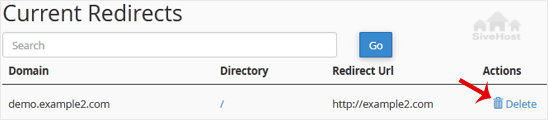
4. For confirmation, click on Remove Redirect once more. 

1. Log in to your cPanel account.
2. In the Domains section, click on Redirects.
3. Scroll down to the end of the page. Under Current Redirects, locate the domain and click on remove.
4. For confirmation, click on Remove Redirect once more.
1. Log in to your cPanel account. 2. In the Domains section, click on Redirects. 3. Under Add...
An Alias domain, formerly known as a parked domain, lets you create a mirror of your primary...
1. Log in to your cPanel account. 2. In the Domains section, click on Domains. 3. In the List...
Before adding the addon domain, point your addon domain nameservers to your primary domain...
You can redirect your add-on domain to another domain.1. Log in to your cPanel account. 2. In...
Vhaḓivhi vhashu vha ḓo fhirisela saithi yaṋu nga nḓila yo tsireledzeaho hu si na tshifhinga tsha u shuma - hu si na mbadelo dzo engedzeaho. U pfulutshela hu si na vhuleme ho shumiwaho nga tshigwada tshashu u itela uri ni kone u livhisa ṱhogomelo kha bindu ḽaṋu.


Copyright © 2026 Creative Matrix. Pfanelo Dzoṱhe Dzo Vhewa.