1. Log in to your cPanel account.
2. In the Domains section, click on Redirects.

3. Scroll down to the end of the page. Under Current Redirects, locate the domain and click on remove. 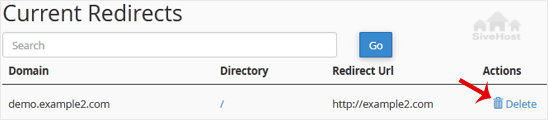
4. For confirmation, click on Remove Redirect once more. 

1. Log in to your cPanel account.
2. In the Domains section, click on Redirects.
3. Scroll down to the end of the page. Under Current Redirects, locate the domain and click on remove.
4. For confirmation, click on Remove Redirect once more.
1. Log in to your cPanel account. 2. In the Domains section, click on Redirects. 3. Under Add...
An Alias domain, formerly known as a parked domain, lets you create a mirror of your primary...
1. Log in to your cPanel account. 2. In the Domains section, click on Domains. 3. In the List...
Before adding the addon domain, point your addon domain nameservers to your primary domain...
You can redirect your add-on domain to another domain.1. Log in to your cPanel account. 2. In...
Ditsebi tša rena di tla fetišetša sebaka sa gago ka polokego ka nako ya go se šome ya lefela - ntle le ditshenyagalelo tše di oketšegilego. Go huduga mo go se nago mathata mo go swarwago ke sehlopha sa rena gore o kgone go tsepamiša kgopolo kgwebong ya gago.


Tokelo ya Ngwalollo © 2026 Creative Matrix. Ditokelo Tšohle di Beetšwe.