1. Log in to your cPanel account.
2. In the Domains section, click on Redirects.

3. Scroll down to the end of the page. Under Current Redirects, locate the domain and click on remove. 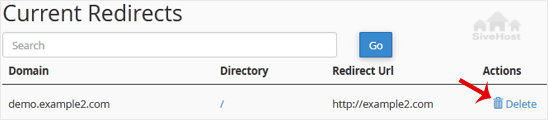
4. For confirmation, click on Remove Redirect once more. 

1. Log in to your cPanel account.
2. In the Domains section, click on Redirects.
3. Scroll down to the end of the page. Under Current Redirects, locate the domain and click on remove.
4. For confirmation, click on Remove Redirect once more.
1. Log in to your cPanel account. 2. In the Domains section, click on Redirects. 3. Under Add...
An Alias domain, formerly known as a parked domain, lets you create a mirror of your primary...
1. Log in to your cPanel account. 2. In the Domains section, click on Domains. 3. In the List...
Before adding the addon domain, point your addon domain nameservers to your primary domain...
You can redirect your add-on domain to another domain.1. Log in to your cPanel account. 2. In...
Iingcwethi zethu zizokudlulisa isayithi yakho ngokuphepha ngaphandle kwesikhathi sokuphumula - ngaphandle kweendleko ezingezelelweko. Ukufuduka ngaphandle kwemiraro kuphathwa lithimba lethu ukwenzela bona ukghone ukutjheja ibhizinisi lakho.


Copyright © 2026 Creative Matrix. Woke Amalungelo Avikelekile.