1. Log in to your cPanel account.
2. In the Domains section, click on Redirects.

3. Scroll down to the end of the page. Under Current Redirects, locate the domain and click on remove. 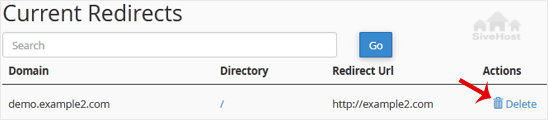
4. For confirmation, click on Remove Redirect once more. 

1. Log in to your cPanel account.
2. In the Domains section, click on Redirects.
3. Scroll down to the end of the page. Under Current Redirects, locate the domain and click on remove.
4. For confirmation, click on Remove Redirect once more.
1. Log in to your cPanel account. 2. In the Domains section, click on Redirects. 3. Under Add...
An Alias domain, formerly known as a parked domain, lets you create a mirror of your primary...
1. Log in to your cPanel account. 2. In the Domains section, click on Domains. 3. In the List...
Before adding the addon domain, point your addon domain nameservers to your primary domain...
You can redirect your add-on domain to another domain.1. Log in to your cPanel account. 2. In...
Kwararrunmu za su canja wurin rukunin yanar gizon ku amintacce tare da lokacin faɗuwar rana - ba tare da ƙarin farashi ba. Ƙaura marar wahala da ƙungiyarmu ta sarrafa don ku iya mai da hankali kan kasuwancin ku.


Copyright © 2026 Creative Matrix. All Rights Reserved.